The 6 R’s: AWS Migration Strategies
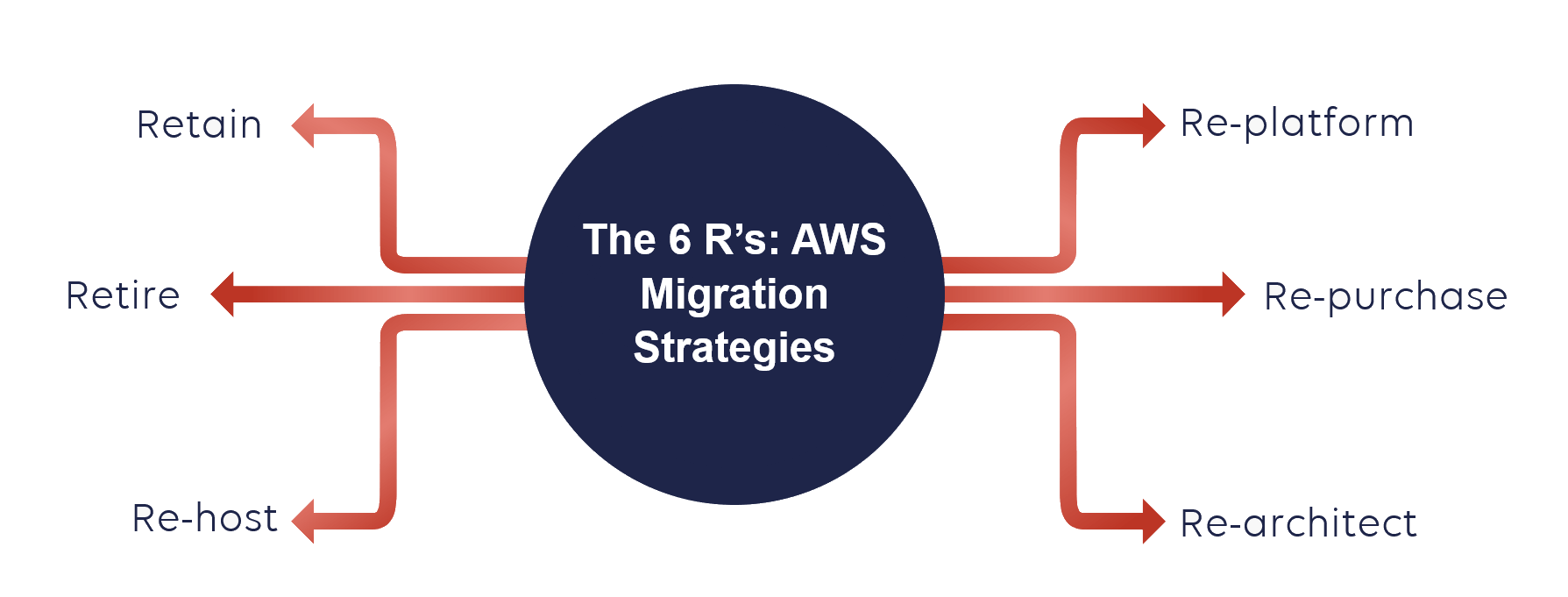
If you were looking at migrating your existing applications to the AWS Cloud, you usually come across something called AWS 6 R’s model or 6 R’s of cloud migration. This originates from the 5 R’s model published by Gartner in 2010, which defined all the basic options to migrate a specific application to the cloud. Amazon Web Services (AWS) adopted this model and extended it to the 6 R’s: Re-host, Re-platform, Re-factor/Re-architect, Re-purchase, Retire and Retain. This post covers the basics for each of these and explains how to decide which AWS migration strategy to choose for your applications.
What is an application migration strategy?
Application migration strategy generally refers to the process of migrating the whole application environment and its computing infrastructure. This is usually driven by business decisions for cost optimization, finding more agility, or simply because of the update of old systems. Here are some basic examples of general application migration:
- Migrate an application from one on-premises data center to another
- From a public cloud to a private cloud environment or vice versa
- From an on-premises server to a public cloud environment
- Migrating an application from one cloud provider to another
Only the last two examples are relevant to application migration to AWS Cloud, and this post focuses on that topic.
Working with our experienced team at Stormit, migrations to AWS are accomplished quickly and securely without undue business interruption.
Comparison of the AWS 6 R’s strategies
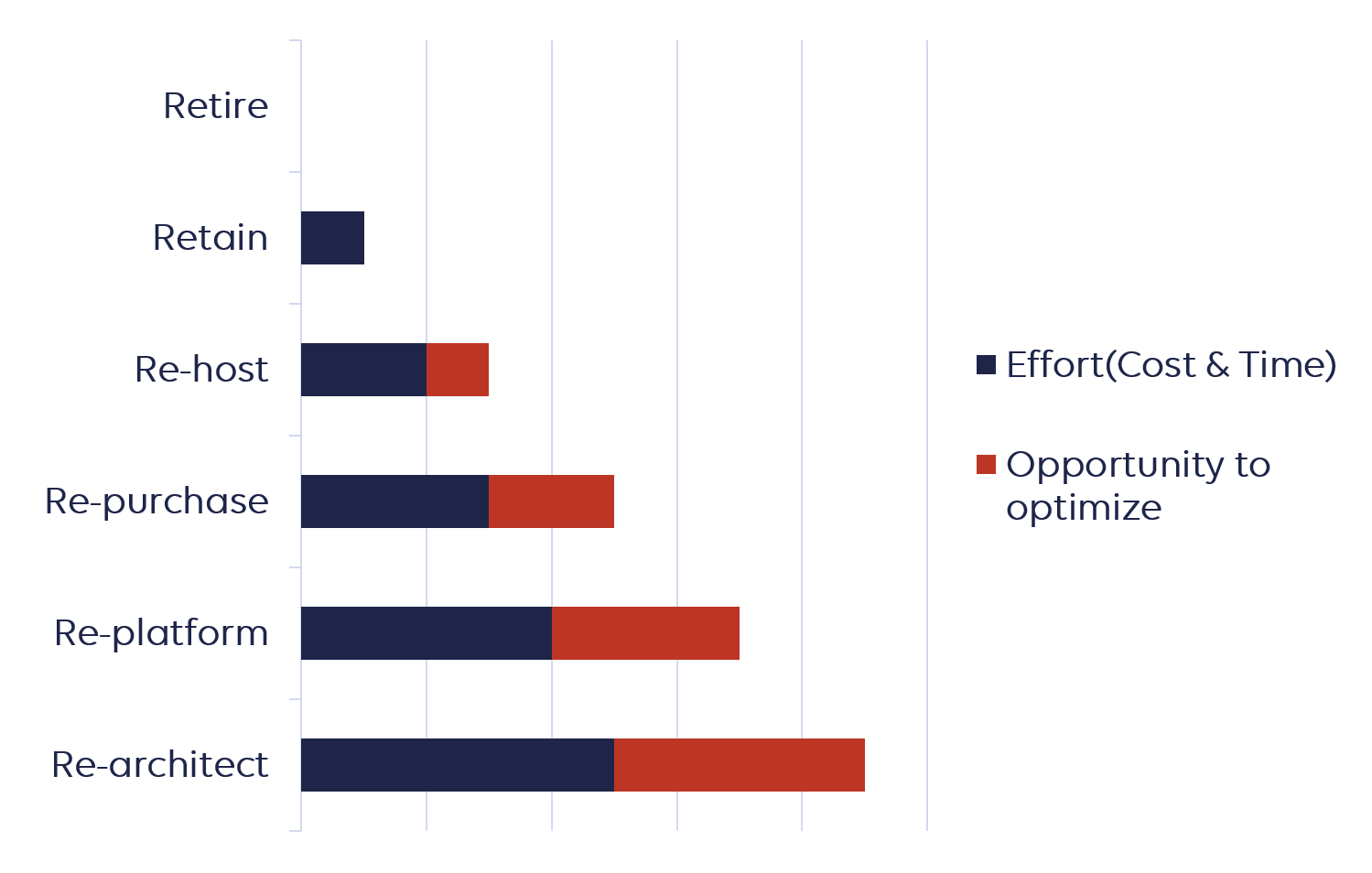
These six strategies differ in their complexity, opportunity to optimize and effort (money and time). The graph below should help you understand which of the strategies is easiest and which is more complex.
Understanding the AWS 6 R’s
Every AWS migration strategy has its own journey and the diagram below should help you understand what are required steps.

1. Retire
After application discovery, you can also decide that you don't need these new applications in the future, so you’re just going to retire them. This is just getting rid of them as you’re not going to use them anymore.
2. Retain
You can decide to keep applications exactly as is, before a re-evaluation sometime in the future.
AN EXAMPLE OF THIS APP MIGRATION STRATEGY:
- Unsupported OS and applications
- Legacy applications that do not have a business justification for migrating to the cloud
3. Re-host
One of the most basic ways of migrating to the AWS Cloud is simply to Re-Host something, and this is sometimes called, “Lift and Shift”. This means to take your applications or systems and move them exactly as is into the AWS Cloud environment.
This approach is great for organizations that need to migrate quickly, for example, data center leases that are about to expire.
For the majority of applications, this type of strategy is also the first step, because it’s easier to optimize/re-architect them once they’re already running in the AWS Cloud.
EXAMPLE:
- Move MySQL database to an Amazon Elastic Compute Cloud (Amazon EC2) instance on AWS.
- This type of app migration strategy was used in our case study: Times of Malta Seamlessly Migrates to AWS Cloud with StormIT
PROS:
- Speed of migration
- Reduced risk of migration
- Could be automated or assisted by tools.- AWS + third-party tools natively support this migration strategy
- Migration of whole systems (databases, VMs) with configuration
CONS:
- You may not use AWS services that give you operational advantages like managed databases, Amazon RDS, DynamoDB, Aurora, Amazon Redshift, and so on
- Potentially inherit performance issues or other problems
4. Re-platform
We also have Re-Platform which is sometimes called Lift and Reshape, because you can potentially take advantage of some of the special capabilities of the AWS cloud.
EXAMPLE:
- Take MySQL database, then deploy it using Amazon RDS MySQL
- Migrating your application to a fully managed platform like AWS Elastic Beanstalk
PROS:
- Option to use services that are close to existing infrastructure without requiring code change
- No dependency on OS, hypervisor or underlying physical hardware platform
- Opportunity to utilize modern OS/DB features/functionality
- In some cases, it is possible to use automated tools
CONS:
- Requires additional planning and coordination and these projects may be time-consuming and costlier
- Necessary knowledge of these “new” cloud services
5. Re-architect
This is the most advanced application migration strategy. Put simply it is a redesign of your application in a more cloud-native manner. In general, you create a serverless version of a legacy application.
EXAMPLE:
- Migrate your on-premises Oracle database to Amazon Aurora PostgreSQL
- You can choose to modernize your monolithic application by breaking it down into smaller microservices and leverage services like Amazon Elastic Kubernetes Service, AWS Lambda, or AWS Fargate
- This type of app migration strategy was used in our case study: InScope Choses StormIT and AWS for Deployment of their AML Solution
PROS:
- Highly increased efficiency, agility and improved cost
- Eliminating dependency on custom hardware or proprietary technology platforms
- No infrastructure/servers to maintain
CONS:
- Careful evaluation of partners/vendors required
- Rearchitecting usually grows in time and effort
- Requires a very good understanding of all aspects of the application, compliance, code, design, and so on
6. Re-purchase
This involves abandoning the existing software that you have and migrating to a cloud-first application. This migration can take two forms: transferring your software license from an on-premises server to AWS (e.g. using a VM Import/Export tool), or completely replacing your current application with SaaS options. These solutions can usually be found via the AWS Marketplace or AWS Service Catalog.
EXAMPLE:
- Changing your web application firewall (WAF) to the one available on AWS(AWS WAF) with managed rules
- Swapping a self-run email system for an online email-as-a-service offering
PROS:
- Reduces effort/increases speed of migration
- Replace legacy systems with modern applications and SaaS
CONS:
- Difficulty with an understanding of dependencies in your current systems
- Your team needs to learn how to administer a new cloud system
If you want to know more about migration strategy or cloud migration, try reading about Stormit migration strategy or visit our page about cloud migration.
How to decide which application migration strategy to choose?
This decision always depends on the specifics of your current application. If you have two or more applications, you could, for example, start with the simpler ones and migrate them, and when you gain more knowledge and experience, migrate the more advanced applications.
Making the right decision also involves understanding how your new environment will operate once you get your data to the cloud and what the specific benefits of using an AWS Cloud environment are for your business.

An AWS Solutions Architect with over 5 years of experience in designing, assessing, and optimizing AWS cloud architectures. At Stormit, he supports customers across the full cloud lifecycle — from pre-sales consulting and solution design to AWS funding programs such as AWS Activate, Proof of Concept (PoC), and the Migration Acceleration Program (MAP).

